Brasilino
How a library helps bring Brazilians into the Arduino world.
According to a study conducted by Education First, the sixth edition of the EF EPI (EF English Proficiency Index), published in November 2016, Brazil ranked 40th out of 72 countries in English proficiency, with a score rated as “low” by the study. This gap is even more pronounced among less privileged social groups.
Brasilino was created around the idea that, by breaking down this initial barrier, we can encourage Brazilians to take their first steps with the Arduino platform and develop their own solutions. This first experience can help dispel the notion that programming is difficult. Then, once language becomes the only remaining barrier, users can gradually transition from programming with Brasilino to programming directly with Arduino.
We believe that English is important for a good programmer, but it should not be a prerequisite. People can discover a passion for programming, electronics, IoT, robotics, and all the other fields in which English proficiency eventually becomes necessary. Once immersed in this world, students may feel the need to learn the language gradually and transition to Arduino's original programming syntax.
As an open-source library licensed under GPL-3.0, Brasilino benefits from the support of the entire community. Users are allowed and encouraged to modify the library, whether for personal use or to submit improvements to the official library.
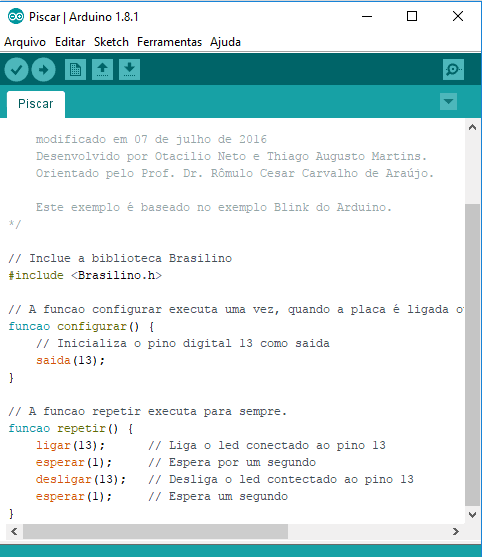
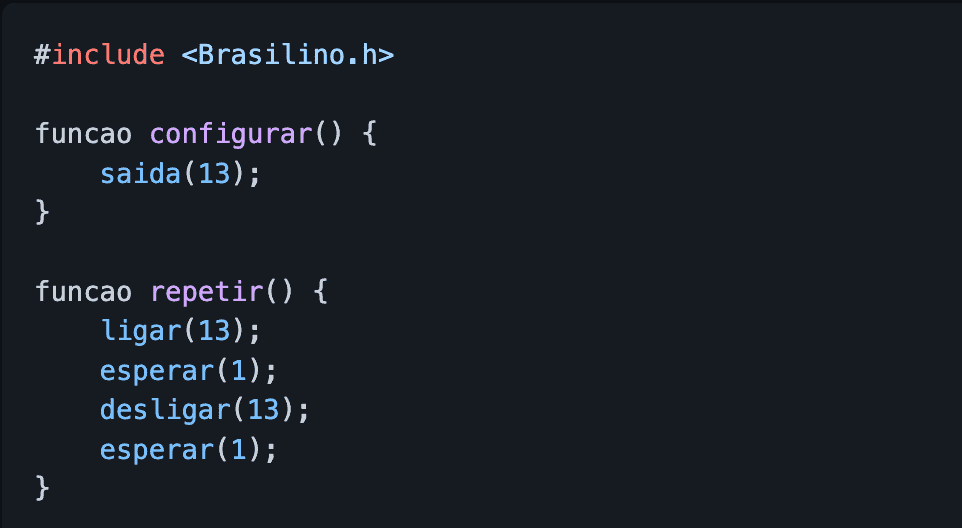
Brasilino not only translates existing Arduino commands, but also introduces new, simplified ones. For example, digitalWrite(13, HIGH);, the command used to turn on Arduino pin 13, can simply be written as ligar(13); in Brasilino. The command for(int x = 0; x < 10; x++) can be replaced with contarAte(10);.
The library includes several explanatory examples of how to program with Brasilino, as well as built-in support for some sensors, such as ultrasonic sensors. Brasilino is available through the Arduino Library Manager and can be downloaded directly from the Arduino IDE by going to Sketch → Include Library → Manage Libraries and searching for Brasilino.
The library is also available on GitHub, where you can find more information and suggest new improvements.